
Download Macsome Amazon Music Downloader – free, secure, fast Amazon music downloader
Overview
Macsome Amazon Music Downloader is a dedicated music companion for Windows and macOS that lets you download songs, playlists, albums, and podcasts directly from Amazon Music Unlimited and Prime Music. The free edition gives you a taste of the core capabilities—batch downloading, format conversion, and basic metadata handling—while the paid plans unlock high‑speed downloading, advanced tag editing, and unlimited conversions. What sets this tool apart is its ability to transform protected Amazon streams into common audio files such as MP3, AAC, FLAC, AIFF, and WAV without requiring the official Amazon Music client.
After logging in with your Amazon credentials, the downloader scans your library, presents a clean list of selectable items, and lets you choose the output format and destination folder. All converted tracks retain essential ID3 tags—artist, album, genre, cover art, release year—so your music library stays organized across devices. Whether you want to enjoy Amazon‑exclusive tracks on a classic MP3 player, a gaming console, or a mobile device, Macsome Amazon Music Downloader offers a seamless bridge between the cloud and your personal collection, all while maintaining high audio fidelity.
Key Features
- Multi‑format conversion: Export Amazon Music tracks to MP3, AAC, FLAC, AIFF, or WAV with customizable bitrate settings.
- Batch downloading: Select entire playlists or albums and download them in one click, saving time for large libraries.
- Full ID3 tag preservation: Keep album art, artist name, genre, track number, and release year intact during conversion.
- Cross‑platform playback: Saved files work on iPhone, iPad, Android phones, PS5, Xbox One, MP3 players, and any device that supports standard audio formats.
- Secure login: Uses Amazon’s OAuth flow; your credentials never leave your computer.
- Lightweight installer: No need to install the full Amazon Music app; the downloader works independently.
- Free trial with upgrade path: The free edition allows limited downloads per day; premium plans remove caps and add priority support.
- Automatic updates: The software checks for the latest version on launch, ensuring compatibility with Amazon’s streaming changes.
- Technical support: Email and live‑chat assistance for both free and paid users.
Installation & Usage Guide
Getting started with Macsome Amazon Music Downloader is straightforward. Follow these steps to ensure a smooth experience:
- Download the installer: Visit the official Macsome website and click the “Download for Windows” or “Download for macOS” button. The installer is a small
.exe(Windows) or.dmg(macOS) file, typically under 30 MB. - Run the installer: On Windows, double‑click the
.exeand follow the wizard. On macOS, drag the app icon into your Applications folder. The process includes a license agreement and an optional desktop shortcut. - Launch the application: Open Macsome Amazon Music Downloader from the Start menu or Launchpad. The first run may trigger a security warning; grant the necessary permissions to allow network access.
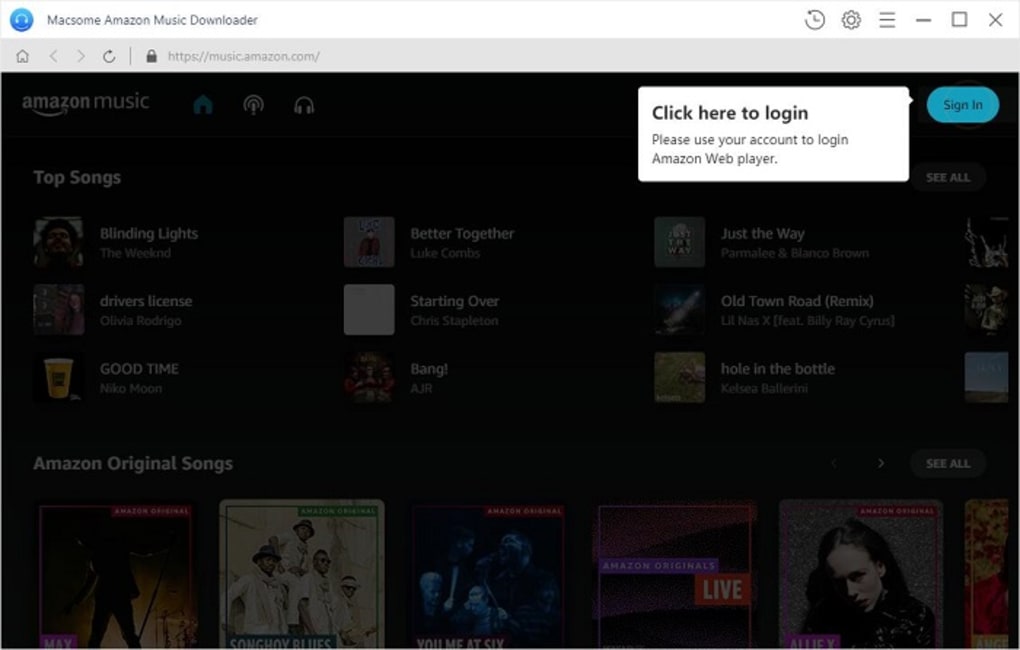
- Log in with your Amazon account: Click the “Sign In” button. A secure Amazon login window appears; enter your credentials. The app never stores your password locally—it receives an access token from Amazon.
- Browse your library: After authentication, the interface displays your Amazon Music library, grouped by “Songs,” “Albums,” “Playlists,” and “Podcasts.” Use the search bar to locate specific tracks.
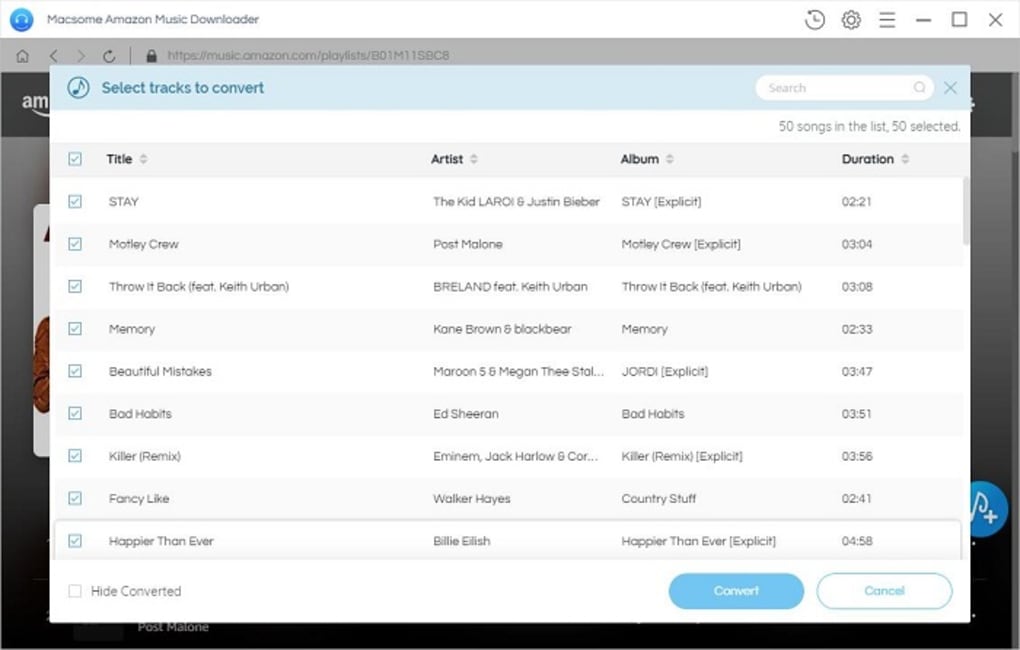
- Select items to download: Tick the checkboxes next to desired songs, or click the “Select All” button for an entire playlist. Choose the output format from the dropdown (MP3, FLAC, etc.) and set the destination folder.
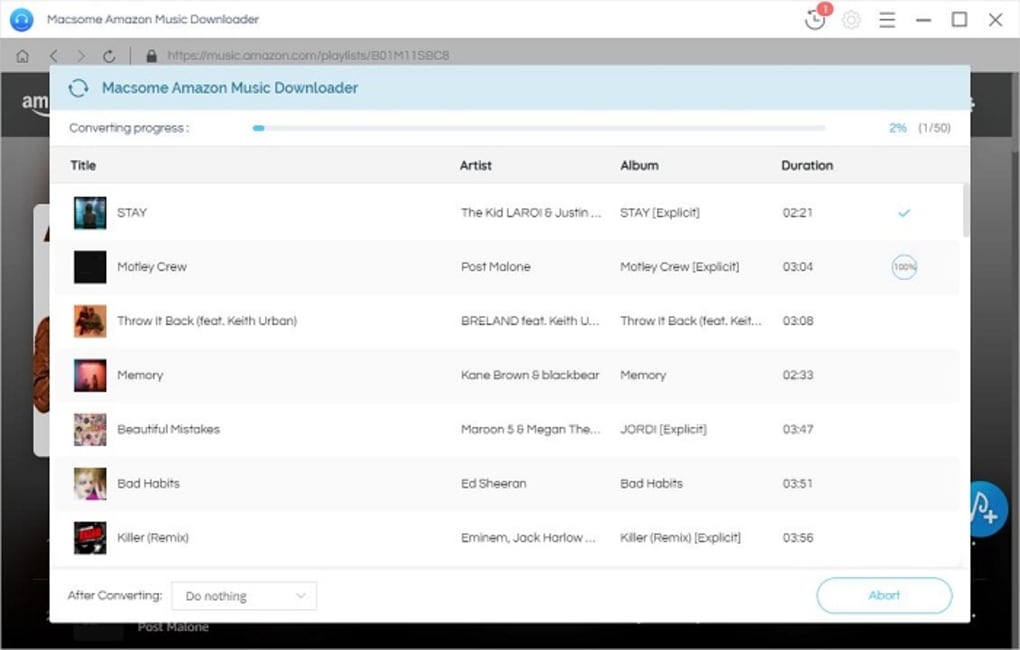
- Start the download: Press the “Download” button. A progress bar shows real‑time status, and you can pause or cancel at any moment. For large batches, the app creates subfolders by album or artist to keep files organized.
- Verify the files: Once finished, navigate to the output folder. Each file should include proper ID3 tags; you can view them with any media player or tag editor.
- Upgrade if needed: If you hit the daily limit in the free version, a pop‑up offers a seamless upgrade to a premium plan. Payment is processed securely via PayPal or credit card.
Tips for optimal use: keep the application updated to avoid compatibility issues with Amazon’s streaming protocol; use a wired internet connection for faster batch downloads; and regularly back up your converted library to an external drive or cloud storage.
Compatibility, Pros & Cons
Macsome Amazon Music Downloader runs on Windows 10/11 (64‑bit) and macOS 10.15 Catalina or later. The software does not support Linux or mobile operating systems directly, but the output files can be transferred to any device that plays standard audio formats.
Pros
- High‑quality conversion preserving original audio fidelity.
- Supports the most popular audio formats, giving you flexibility.
- Retains full ID3 metadata, simplifying library management.
- Batch download feature saves time for large collections.
- No need to install the official Amazon Music app.
- Free version available for casual users.
- Regular automatic updates keep the tool compatible with Amazon’s changes.
- Responsive technical support for both free and paid users.
Cons
- Free edition imposes daily download limits, which may frustrate power users.
- Only Windows and macOS are supported; no native Linux client.
- Initial login requires an Amazon account; the tool cannot work with offline Amazon credentials.
- Advanced tag editing (custom artwork, batch renaming) is only in the premium version.
- Occasional “rate‑limited” messages when Amazon detects high‑volume requests.
Overall Rating: 4.5/5
Pros: High‑quality conversion, broad format support, batch download, metadata retention, free trial.
Cons: Daily limits in free tier, Windows/macOS only, premium required for advanced features.
Frequently Asked Questions
Can I use Macsome Amazon Music Downloader without an Amazon Music subscription?
The downloader requires a valid Amazon account, but you can only download content that you already have access to. If you have a Prime account, you can download Prime‑eligible tracks; for Amazon Music Unlimited, you need an active subscription to retrieve Unlimited songs.
Is the software safe and free from malware?
Yes. Macsome distributes the downloader through its official website with a digitally signed installer. The program does not contain adware or spyware, and it uses Amazon’s OAuth authentication, meaning your password is never stored or transmitted to third parties.
What audio quality can I expect after conversion?
The converter preserves the original bitrate of the Amazon stream, which is typically 256 kbps for Unlimited and 128 kbps for Prime. When you choose lossless formats like FLAC or WAV, the software up‑samples the audio without adding extra detail, but the source quality remains the same. The result is a clean, high‑fidelity file suitable for most listening scenarios.
Can I download podcasts from Amazon Music with this tool?
Yes. The downloader treats podcasts as part of your Amazon library. After logging in, switch to the “Podcasts” tab, select the episodes you want, and choose your preferred output format. The same ID3 tagging rules apply, though podcasts usually use simpler metadata.
How do I upgrade from the free version to a paid plan?
Within the application, click the “Upgrade” button on the toolbar. You will be redirected to a secure checkout page where you can choose a monthly or annual subscription. After payment, the license key is automatically applied, and the download limits are removed immediately.
Conclusion & Call to Action
Macsome Amazon Music Downloader bridges the gap between Amazon’s streaming ecosystem and the broader world of digital audio. By offering high‑quality conversion, batch processing, and meticulous metadata preservation, it empowers music lovers to enjoy their favorite Amazon tracks on any device—whether it’s a vintage MP3 player, a gaming console, or a modern smartphone. While the free edition is generous enough for casual users, power listeners will quickly see the value in upgrading to a premium plan for unlimited downloads and advanced features. If you’re looking for a secure, fast, and user‑friendly way to expand your music library beyond Amazon’s native apps, this downloader is a solid investment.
Ready to take control of your Amazon Music collection? Download Macsome Amazon Music Downloader now and start converting your favorite tracks in minutes.







